The Follow-Up Step
When you record a checkride outcome as a Discontinuance or Disapproval, a follow-up step appears before the outcome is saved. This step lets you decide immediately what happens next for the applicant.
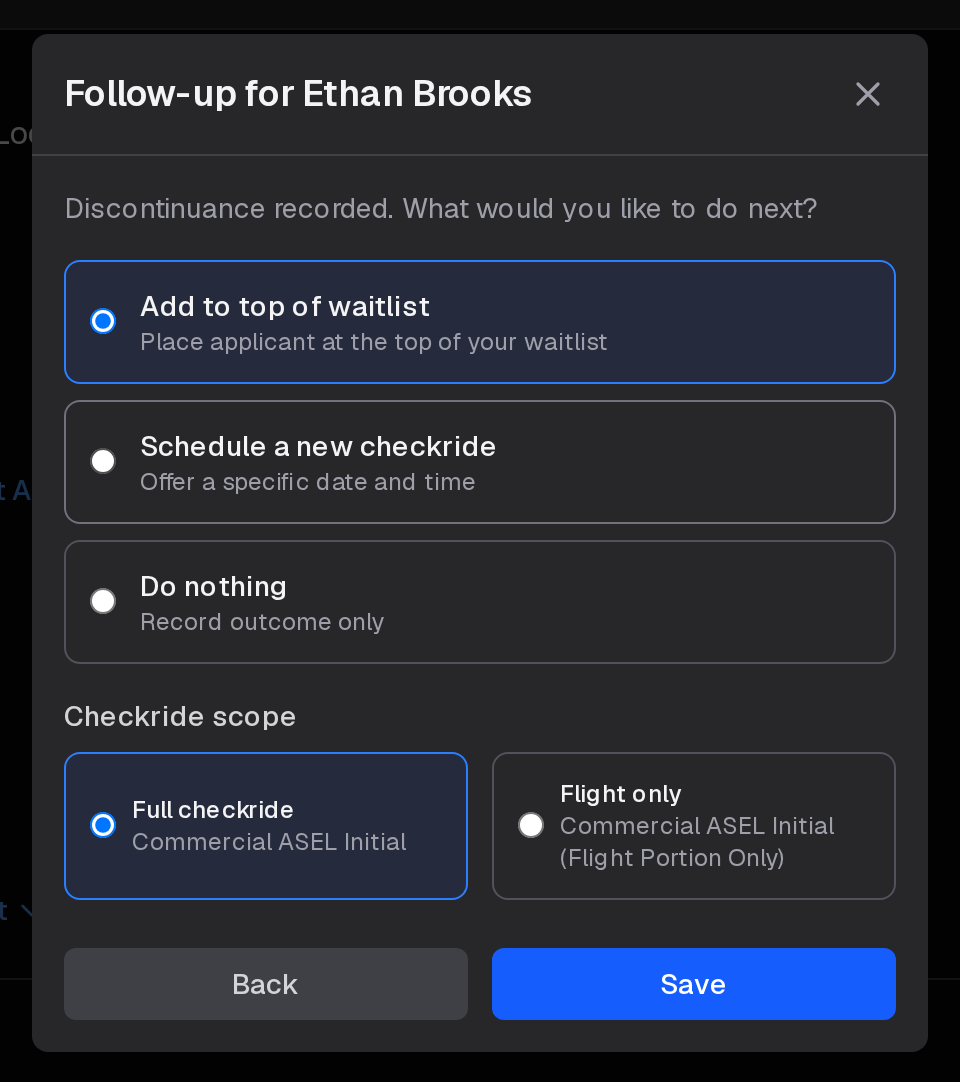
You have three options:
- Add to top of waitlist — Places the applicant at the front of your waitlist immediately.
- Schedule a new checkride — Opens a scheduling form so you can book a specific date and time directly.
- Do nothing — Records the outcome only, with no further action taken.
Add to Top of Waitlist
Selecting this option returns the applicant to your waitlist at the highest priority position. The platform finds the lowest existing waitlist position among all your current applicants and places the returning applicant ahead of everyone else. If the applicant already has an entry on your waitlist, that entry is updated in place rather than creating a duplicate.
The waitlist entry is flagged to reflect the original outcome — either as a discontinuance or disapproval — so you and the scheduler both have that context when the applicant is next offered a slot.
Before confirming, you can select whether the new waitlist entry is for a full checkride or flight-only portion, which controls what the scheduler will offer when it reaches this applicant.
Schedule a New Checkride
Selecting this option lets you book a new checkride for the applicant without going through the waitlist. A form appears where you enter the date, start time, and location. The end time is calculated automatically based on your checkride configuration for that type.
You can also choose between a full checkride or flight-only checkride before submitting. The new checkride is created in a confirmed state — the applicant does not need to accept an offer.
Do Nothing
If you select this option, the outcome is recorded but the applicant is not returned to your waitlist and no new checkride is created. You can always add the applicant back to your waitlist manually later from the waitlist management page.