Accessing Checkride Type Configuration
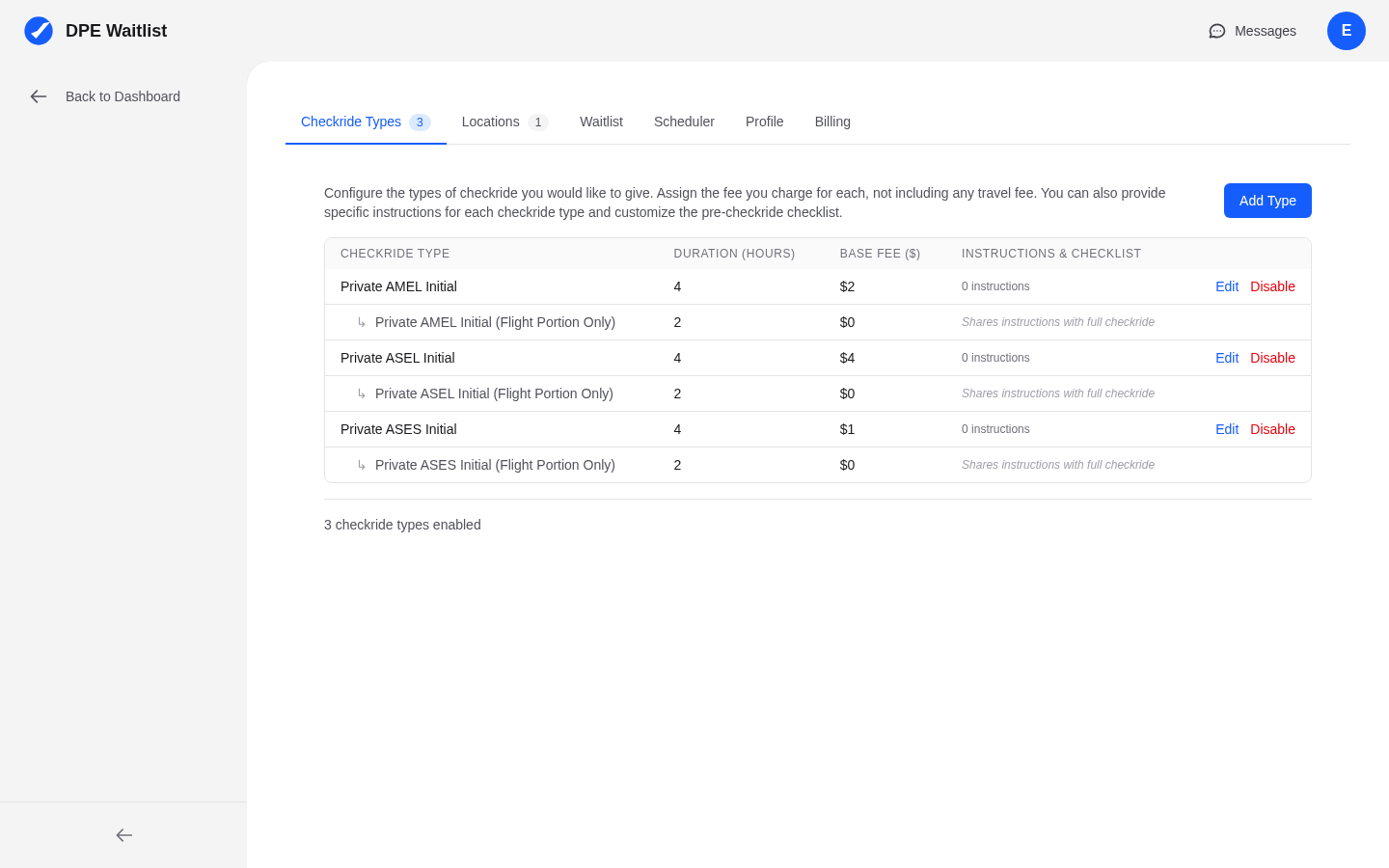
To configure your checkride types, navigate to Settings in the sidebar and select the Checkride Types tab. This page lists all the checkride types you currently offer and allows you to add, edit, or remove them.
Adding a New Checkride Type
Click the button to add a new checkride type. You will be presented with a list of FAA checkride types to choose from. The list covers all practical test combinations, including:
- Private Pilot — ASEL, AMEL, rotorcraft, glider, and other category/class combinations
- Instrument Rating — Airplane, helicopter
- Commercial Pilot — ASEL, AMEL, rotorcraft, and more
- Airline Transport Pilot (ATP) — Airplane and other categories
- Flight Instructor (CFI) — Initial, CFII, MEI, and related certificates
Select the specific type that matches your FAA designation.
Setting the Duration
For each checkride type, you must set the expected duration in minutes. This is how long the scheduler allocates for the checkride on your calendar. Common durations include:
- Private Pilot ASEL: 180-240 minutes (3-4 hours)
- Instrument Rating: 180-240 minutes (3-4 hours)
- Commercial Pilot ASEL: 120-180 minutes (2-3 hours)
- CFI Initial: 240-300 minutes (4-5 hours)
- ATP: 180-240 minutes (3-4 hours)
Set the duration based on how long you typically need for each type, including both the oral and flight portions.
Understanding Type Variants
Many checkride types have variants based on aircraft category and class. For example, a Private Pilot checkride has separate types for Airplane Single-Engine Land (ASEL), Airplane Multi-Engine Land (AMEL), Rotorcraft Helicopter, and others. Make sure you add the specific variants that match your authorization and the aircraft types available in your area.
Editing an Existing Type
To change the duration or other settings for a checkride type you have already added, click on it in your configuration list and update the values. Changes to duration affect how the scheduler allocates time for future checkrides but do not change the duration of already-scheduled checkrides.
Removing a Checkride Type
If you no longer offer a particular checkride type, you can remove it from your configuration. Be aware that removing a type may affect applicants on your waitlist who are waiting for that type. Review your waitlist before removing a type to make sure no one is left without a path forward.